Close Menu
  • Latest Posts
  • Technology
  • Gadgets
  • News
  • AutoMobile
  • Education
  • Trending
  • Article
  • Sports
  • Railway
  • Business
  • Entertainment
  • National
  • Political
  • Knowledge
  • World
  • Tech Guide
  • Ayodhya
  • Viral
  • Lifestyle
  • Aaj Ka Rashifal
  • Breaking News
  • Defence
  • Fack Check
  • Home
WhatsApp Facebook X (Twitter) Telegram
Subhash Yadav
  • Home
  • News
  • Education
  • Sports
  • Technology
  • Entertainment
Facebook X (Twitter) Instagram
Subhash Yadav
Home»Latest post»3 Tips and Trick to Increase PC Performance in Hindi | कंप्यूटर की स्पीड कैसे बढाये?

3 Tips and Trick to Increase PC Performance in Hindi | कंप्यूटर की स्पीड कैसे बढाये?

Rakesh KumarBy Rakesh Kumar06/02/20244 Mins Read
Facebook WhatsApp Twitter Telegram LinkedIn
3 Tips and Trick to Increase PC Performance in Hindi

अगर आपका भी लैपटॉप स्लो हो गया है या फिर वह हैंग करता है तो आप चिंता न करें क्योंकि इस आर्टिकल के अंदर हम आपको बताएंगे कुछ ऐसे तरीके जिनको अपना कर आप अपने सिस्टम को वायरस फ्री कर सकते हो तथा आप अपनी सिस्टम की स्पीड को भी इंक्रीज कर सकते हो हम आपके यहां पर जितनी भी मेथड को बताएंगे आपको उन सभी मेथड को अपने सिस्टम में अप्लाई करना है उसके बाद आप देखेंगे कि आपकी सिस्टम की स्पीड काफी ज्यादा बढ़ चुकी है और आपको अपने सिस्टम में काफी हद तक परफॉर्मेंस अच्छा देखने को मिलेगा तो चलिए बढ़ाते हैं आगे और आपको बताते हैं कि आप किस तरह से अपनी सिस्टम की स्पीड को बढ़ा सकते हो.

Method 1 of 3 Tips and Trick to Increase PC Performance in Hindi

तो हमारे सिस्टम को फास्ट करने का जो सबसे पहला तरीका है वह हम सभी करेंगे अपने My Computer या फिर This Pc से सबसे पहले आपको अपना This Pc या फिर my computer ऑन कर लेना है उसके बाद आपको कुछ ड्राइव देखेंगे जैसे सी ड्राइव या फिर दी ड्राइव आपको सिंपली C Drive के ऊपर अपने माउस का राइट बटन क्लिक करना है उसके बाद आपको Properties वाले ऑप्शन पर क्लिक करना है उसके बाद Disk Cleanup वाले ऑप्शन में क्लिक करना है अब आपको हल्का सा यहां पर वेट करना है लगभग 4 से 5 सेकंड उसके बाद आपके सामने एक न्यू पॉपअप आ जाएगा आप यहां पर आपके पास जितने भी ऑप्शन दिखेंगे आपको सभी में टिक कर देना है उसके बाद आपको सिंपली नीचे में cleanup system files का ऑप्शन दिखेगा आपको उसमें क्लिक कर देना है अब इसमें क्लिक कर देने के बाद आपको यहां पर तकरीबन 10 से 15 सेकंड का टाइम लगेगा आपको यहां पर वेट करना है उसके बाद आपके सामने एक न्यू पॉप आ जाएगा.

आपको फिर से उन सभी ऑप्शंस को tik कर देना है और delete वाले बटन पर क्लिक कर देना है उसके बाद आप यहां पर देखेंगे कि आपका सी ड्राइव का डिस्क क्लीनअप हो जाएगा इससे आपकी जितने भी अननेसेसरी फाइल थे वह सभी डिलीट हो जाएंगे और आपके सिस्टम में पहले से इंप्रूवमेंट देखने को मिलेगा.

3 Tips and Trick to Increase PC Performance in Hindi

Method 2 of 3 Tips and Trick to Increase PC Performance in Hindi

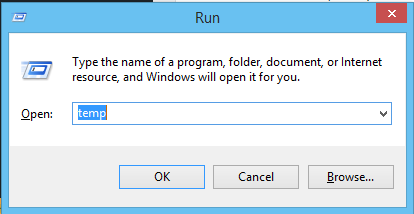
अब बात करते हैं हम सभी अपने दूसरे मेथड के बारे में दूसरे मेथड में सबसे पहले आपको अपने कीबोर्ड में Win + R बटन को दबाना है आप जैसे ही Win + R बटन को दबाओगे आपके पास Run ओपन हो जाएगा आपको उसके अंदर Temp सर्च करना है Temp करने के बाद आपको सिंपली ओके वाले बटन पर क्लिक कर देना है और एक Popup आएगा आपके सामने तो उसे ओके कर देना कंटिन्यू कर देना उसके बाद आपके सामने एक फाइल ओपन होगा जिसमें काफी सारे फाइल्स होंगे तो सिंपली आपको उन सभी को डिलीट करना है डिलीट करने के लिए अपने कीबोर्ड में Ctr + A type करना है उसके बाद डिलीट वाले बटन पर क्लिक करके डिलीट कर देना है अपने डिलीट बटन को जैसे ही दबाओगे आपके सामने एक Popup आएगा आपको सिंपली इसकी पहले बटन पर क्लिक कर देना है और आप यहां पर देखेंगे आपके जितने भी अननेसेसरी फाइल थे वह सभी डिलीट हो जाएंगे.
WhatsApp Channel Join Now
Telegram Group Join Now
3 Tips and Trick to Increase PC Performance in Hindi


Method 3 of 3 Tips and Trick to Increase PC Performance in Hindi

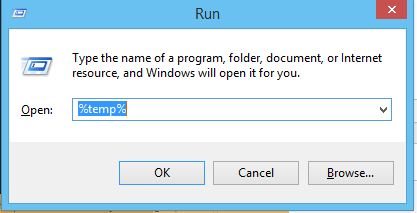
अब नंबर तीन में जो हमारे पास मेथड आता है इसमें आपको फिर से Win + R बटन को दबाना है और आपके सामने Run ओपन हो जाएगा यहां पर आपको सर्च करना है %temp% उसके बाद सिंपली आपको ओके पर क्लिक कर देना है अब यहां पर आप देखेंगे आपके सामने एक फाइल ओपन होगा जिसमें काफी सारे फोल्डर या फिर फाइल होंगे तो अब आपको इनको डिलीट करना है जैसा कि पहले आपने किया था अपने कीबोर्ड पर Ctr + A बटन को दबाना है कंट्रोल प्लस ए दबाने से सभी फाइल सेलेक्ट हो जाएंगे उसके बाद आपको डिलीट वाले बटन पर क्लिक करना है और डिलीट कर देना है डिलीट करने से पहले आपके सामने कोई पॉप-अप आएगा तो आपको सिंपली इसकी पहले बटन पर क्लिक कर देना है और आप यहां पर देखेंगे जितने भी आपके फालतू के फाइल थी वह सभी के सभी डिलीट हो जाएगी.
3 Tips and Trick to Increase PC Performance in Hindii

अब तीनों स्टेप्स कंप्लीट कर देने के बाद आपका जो लास्ट स्टेप आता है वह है अपने सिस्टम को रीस्टार्ट करना तो सिंपली अपने सिस्टम को शटडाउन करके दोबारा ऑन कीजिए उसके बाद आप यहां पर देखेंगे कि आपकी सिस्टम में काफी ज्यादा इंप्रूवमेंट देखने को मिलेगा.

computer technology
Follow on Google News Follow on Telegram Follow on WhatsApp
Share. WhatsApp Facebook Twitter Telegram Email Pinterest LinkedIn
Rakesh Kumar
  • Website

Rakesh Kumar एक अनुभवी लेखक हैं जो Tech और AutoMobile पर आर्टिकल लिखते हैं। इनके पास 2 वर्ष का इस क्षेत्र में एक्सपीरियंस है। उनका सबसे अधिक रुचि ऑटोमोबाइल पर रिसर्च करके आर्टिकल लिखने में है। ये मुख रूप से हिंदी में लिखना पसंद करते है। इनसे Rakesh@subhashyadav.org पर संपर्क किया जा सकता है।

Related Posts

अमवामन झील और वाटर स्पोर्ट्स पार्क: 1 जनवरी की छुट्टियां मनाने के लिए बिहार का सबसे आदर्श स्थान स्थान!

By Subhash Yadav23/07/2025

Winter Beauty Tips: सर्दियों में खो गया है चेहरे का नूर? 5 तरह से वापस पाएं निखार!

By Subhash Yadav23/07/2025

चेहरे की सुन्दरता के लिए कुंकुमादि तेल है रामबाण, इसे लगाने से दूर होंगे चेहरे के दाग-धब्बे, जानें इसको लगाने का सही तरीक

By Nikhil Singh Rathore23/07/2025

जापान का सोमिनसाई फ़ेस्टिवल जिसमें पुरुष लगभग नग्न होकर हिस्सा लेते हैं, यह फ़ेस्टिवल अब ख़त्म होने की कग़ार पर!

By Subhash Yadav23/07/2025
Add A Comment
Leave A Reply Cancel Reply

Latest Blog

AI Fiesta: ध्रुव राठी का ने किया नया AI Startup लॉन्च, जानें Features और Price

18/08/2025

Burn Marks Remedy: जलने के निशान से पाना है छुटकारा? आजमाएं ये जादुई घरेलू नुस्खे!

23/07/2025

Vastu Tips: फिटकरी से आपके घर का वास्तु दोष दूर करने का जादुई उपाय!

23/07/2025

इस होली जाने रंग का खास महत्व, जानिये कौनसा कलर अपने पार्टनर को लगाना चाहिए और कौनसा नही

23/07/2025
Subhash Yadav

Subhash Yadav is the largest emerging "news & media publisher" in India. This website is dedicated to helping you understand the world. We provide information on the hottest trends, insights and developments shaping the changing world. Whether you are a savvy businessman, an astute investor or simply interested in exploring topics like technology, science, politics, tech, education, sports and lifestyle, we have something for you.
Email Us: info@subhashyadav.org

Quick Links
  • About Authors
  • Our Authors
  • Advertise
Does Subhashyadav.org take responsibility for the content published here?

Subhash Yadav website is a main information provider platform. This platform makes every effort to ensure that all the content published here is 100% true. But I advise all my users to check the authenticity of the content published here by visiting the official portal of the concerned organization or the Information Department of the Government of India or Print Media, Authenticated News Paper Cutting Evidence and Other.
Any information or article published on Subhashyadav.org is not presented without any solid evidence. Whatever article is published on Subhashyadav.org, its sources are mainly provided from the official website of the concerned organization or Government of India, Print Media, Authenticated News Paper Cutting Evidence and Other 100% Reliable Source.

Copyright @ 2024 All Right Reserved. By SubhashYadav.
  • Home
  • About Us
  • Contact Us
  • Disclaimer
  • Privacy Policy
  • Correction Policy
  • Sitemap
  • Write for Me
  • Editorial Guidelines

Type above and press Enter to search. Press Esc to cancel.

Ad Blocker Enabled!
Ad Blocker Enabled!
Our website is made possible by displaying online advertisements to our visitors. Please support us by disabling your Ad Blocker.